
CubePath Object Storage: S3 Compatible Storage, Private by Default
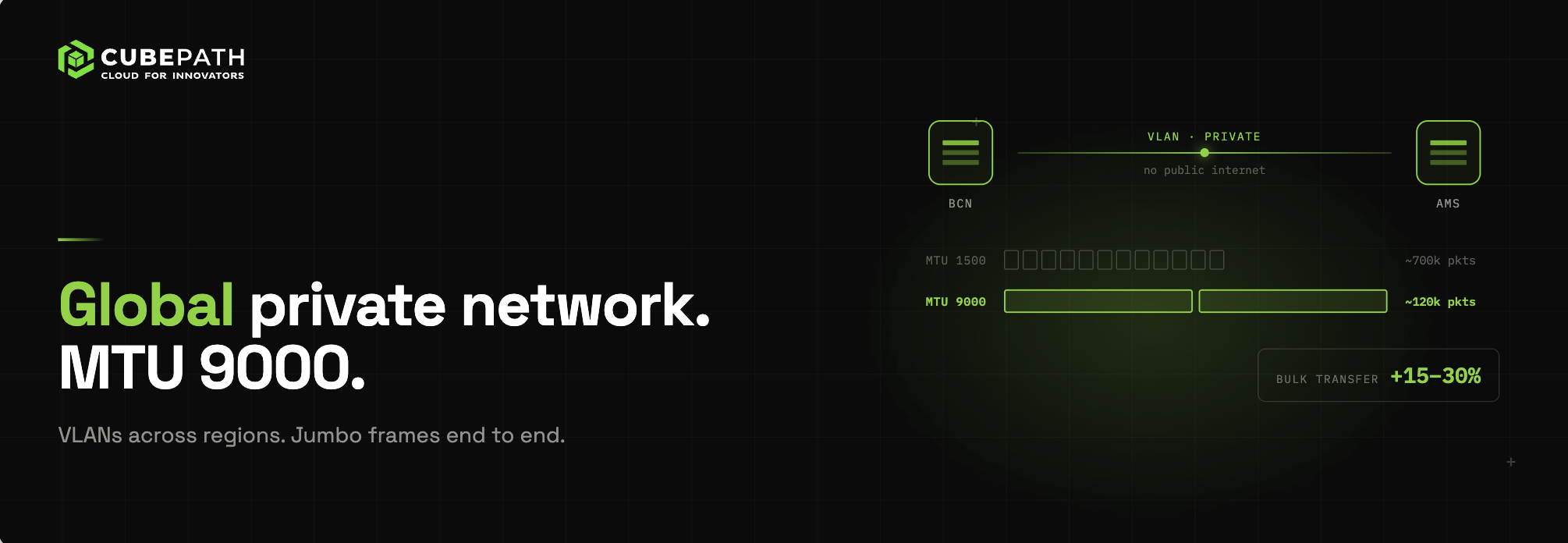
CubePath launches S3 compatible Object Storage at eu.cubestorage.io: private buckets in Barcelona with erasure coding that survives a whole node going down, public delivery through the CDN, and 5 GiB of storage, 5 GiB of egress and 20,000 requests free every month to try it.
On this page10
Almost everything you build ends up producing files that are neither a database nor a server disk. Backups. Videos and images your users upload. Logs you have to keep for months. Build artifacts. Exports someone will ask for a year from now.
Until now, on CubePath those files ended up on a VPS disk, on a volume you kept growing, or with an external storage provider with its own bill, its own console and its own latency. That changes today: CubePath has its own S3-compatible Object Storage, at eu.cubestorage.io.
And so you can try it without thinking twice, every organization gets 5 GiB of storage, 5 GiB of egress and 20,000 requests free every month.
What Object Storage Is and What It Is For
A disk stores blocks and a file system arranges them in folders. Object Storage stores objects: a file, its name and its metadata, inside a bucket. There is nothing to format, nothing to mount and no need to guess how much space you will need next year. You upload, download, list and delete over HTTPS, and you pay for what it takes.
That makes it ideal for everything that keeps growing and is read now and then:
- Backups of databases, servers and Kubernetes clusters.
- User files: photos, videos, documents, attachments.
- Logs and audit data you have to retain.
- Artifacts: builds, images, datasets, exports.
The first tier available is Infrequent Access, on HDD and designed exactly for that: large volumes, a low price per GiB and reads that do not need to be served in milliseconds.
Actually S3 Compatible
S3 is the language almost every piece of software that stores files already speaks. That is why we did not invent a new API. Any S3 client works once you point it at our endpoint:
- Tools:
awscli,rclone,restic,s5cmd,duplicity. - S3 SDKs for any language: boto3, the AWS SDK for JavaScript, Go, Java, PHP.
- Applications that already have an "S3 compatible" setting: Nextcloud, Mastodon, GitLab, Veeam, Velero and hundreds more.
On the CubePath side, Object Storage is everywhere from day one: the dashboard, the API, cubecli, the Terraform provider, the Ansible collection, the Go, Node, PHP and Python SDKs and the MCP server for AI assistants. You can create a bucket with one click or declare it in the same repository as the rest of your infrastructure.
resource "cubepath_object_storage_bucket" "backups" {
  name       = "my-company-backups"
  tier       = "infrequent_access"
  versioning = "enabled"
  protected  = true
}
How It Is Built
The data lives in a three-node cluster in our Barcelona datacenter, in the eu region. Every object is spread with erasure coding: it is split into data and parity fragments distributed across the nine disks of the three nodes. The result is that your objects stay available even if a whole node goes down, not just a disk.
There is a single door in front of the cluster: eu.cubestorage.io, over HTTPS on port 443. That is where TLS ends, every request signature is validated and per-bucket limits are applied. The storage itself lives on a private network that cannot be reached from the internet. No exposed console, no admin API and no management ports in sight.
Both S3 URL styles work: path style, https://eu.cubestorage.io/my-bucket/file, and virtual-hosted style, https://my-bucket.eu.cubestorage.io/file.
Get Started in Three Commands
With cubecli installed and logged in, this is all it takes:
# 1. Create a bucket
cubecli s3 bucket create my-company-backups --tier ia

# 2. Create an access key and save it as environment variables
cubecli s3 key create --name backups --tier ia --output env > .env.cubepath-storage

# 3. Use it with any S3 client
source .env.cubepath-storage
aws s3 cp dump.sql.gz s3://my-company-backups/ --endpoint-url https://eu.cubestorage.io
The key's secret is shown only once, which is why cubecli writes it straight to a file, already in env, rclone or aws format, instead of printing it to the terminal. The dashboard does the same and lets you download it in the format you want.
Clear Prices and a Free Tier to Try It
Object Storage is billed by usage, by the hour, like the rest of CubePath. No minimums, no commitment and no fixed fee for keeping the account open.
| Item | Infrequent Access |
|---|---|
| Storage | $9 per TiB per month ($0.008789 per GiB) |
| Egress to the internet | $10 per TiB ($0.009766 per GiB) |
| Class A requests (writes and listings) | $0.006 per 1,000 |
| Class B requests (reads) | $0.0006 per 1,000 |
| Ingress | Free |
| Deletes | Free |
| Egress to the CubePath CDN | Free |
And every month, per organization, before anything is billed:
- 5 GiB of storage.
- 5 GiB of egress.
- 20,000 requests.
That is enough to try it for real: set up your nightly backups, connect a test application or serve the images of a small website. If you stay within it, the bill is zero. The dashboard always shows how much you have used this month, bucket by bucket, and how much of the free tier is left.
Your Buckets Are Always Private
We made a deliberate decision here: a CubePath bucket is never public. No public ACLs, no open bucket policies, no anonymous URLs. It is the misconfiguration that has exposed more data than any other in the history of cloud storage, and the simplest way to avoid it is to make it impossible.
When you want to serve files to the public, like the images of a website or the videos of an app, the way is the CubePath CDN. You add the bucket as the origin of a CDN zone and that is it. Behind the scenes a read-only key is created exclusively for the CDN edges, which only they can use. Your users download from the nearest cache, on your own domain, with your cache rules and WAF protection.
cubecli cdn origin create <zone> --name assets --bucket my-company-assets
On top of that, traffic from the bucket to the CDN is free. You pay for CDN delivery, not twice for the same GiB.
To share a single file without going through the CDN, S3 presigned URLs still work, with a maximum lifetime of 24 hours.
A File Browser in the Dashboard
Not everybody wants to open a terminal to see what is in a bucket. In the dashboard, every bucket has a Files tab with folders, search and pagination. You can upload files by dragging them in, including large ones, which are uploaded in parts in parallel; download them, preview images, create folders and delete.
Uploads and downloads go straight to eu.cubestorage.io with signed URLs that expire in minutes. Files never pass through an intermediate server.
Keys With Exactly the Scope They Need
An Object Storage key does not need to be able to do everything. When you create one you choose:
- Permission: read and write, or read only.
- Buckets: every bucket in the project or only the ones you list.
- Expiry: none, or a date after which it stops working.
So the backup job can write to its bucket and no other, the app that serves images can only read, and the key you gave an external provider for a migration disappears on its own when the project ends. Revoking a key is immediate.
Buckets also support versioning, to recover a file that was overwritten or deleted by mistake, and deletion protection, so nobody can delete an important bucket without removing it first.
What Is Coming Next
This is the first version. These are the features we are working on now, roughly in this order:
- Share links from the dashboard: a temporary link to a file, from 15 minutes to 24 hours, that you can revoke at any time.
- Tags: tags on buckets to organise them and see cost by tag, and tags on objects from the file browser.
- Charts per bucket: size, objects, traffic and requests over time, with the same numbers you see on the invoice.
- Usage alerts: email, Slack or Discord when a bucket passes a size, the month's traffic passes a limit or errors go up.
- Lifecycle rules: delete old files, old versions and unfinished uploads automatically, the way backup tools like restic, Veeam or Velero expect.
- Object Lock: immutable backups that nobody can delete or overwrite until the retention period ends, as protection against ransomware.
- Encryption at rest: every object encrypted on disk by default, with nothing to change on your side.
- Event notifications: a signed webhook, or a message in Slack or Discord, when files are created, deleted or tagged.
- Bucket replication: an automatic copy of a bucket to another CubePath bucket or to an external S3 provider.
If one of these matters to you more than the rest, tell us and we will take it into account.
Where It Fits
Object Storage does not replace your servers' disks or your database. It is the place for everything else: what grows, what has to be kept and what is served as a file. Having it on the same platform as your VPS, your Kubernetes clusters and your CDN means one bill, one dashboard, the same permissions and the same network.
Create a bucket, upload your first files and use the free tier to check that it fits. If something does not work the way you expect, tell us.