

Kubernetes won. Whether you're deploying a SaaS product, running microservices, or scaling AI workloads, Kubernetes has become the default way to run containers in production. But let's be honest, setting it up and keeping it running is a pain.
You need to provision an etcd cluster, configure the API server, set up networking, manage TLS certificates, plan upgrades, handle backups... and that's just the control plane. Before you've deployed a single container, you've already burned days (or weeks) of engineering time.
That's exactly why we built CubePath Managed Kubernetes. One click, and you have a production-ready cluster running. No infrastructure headaches. No Kubernetes babysitting. Just deploy your apps and go.
The Problem We Solved
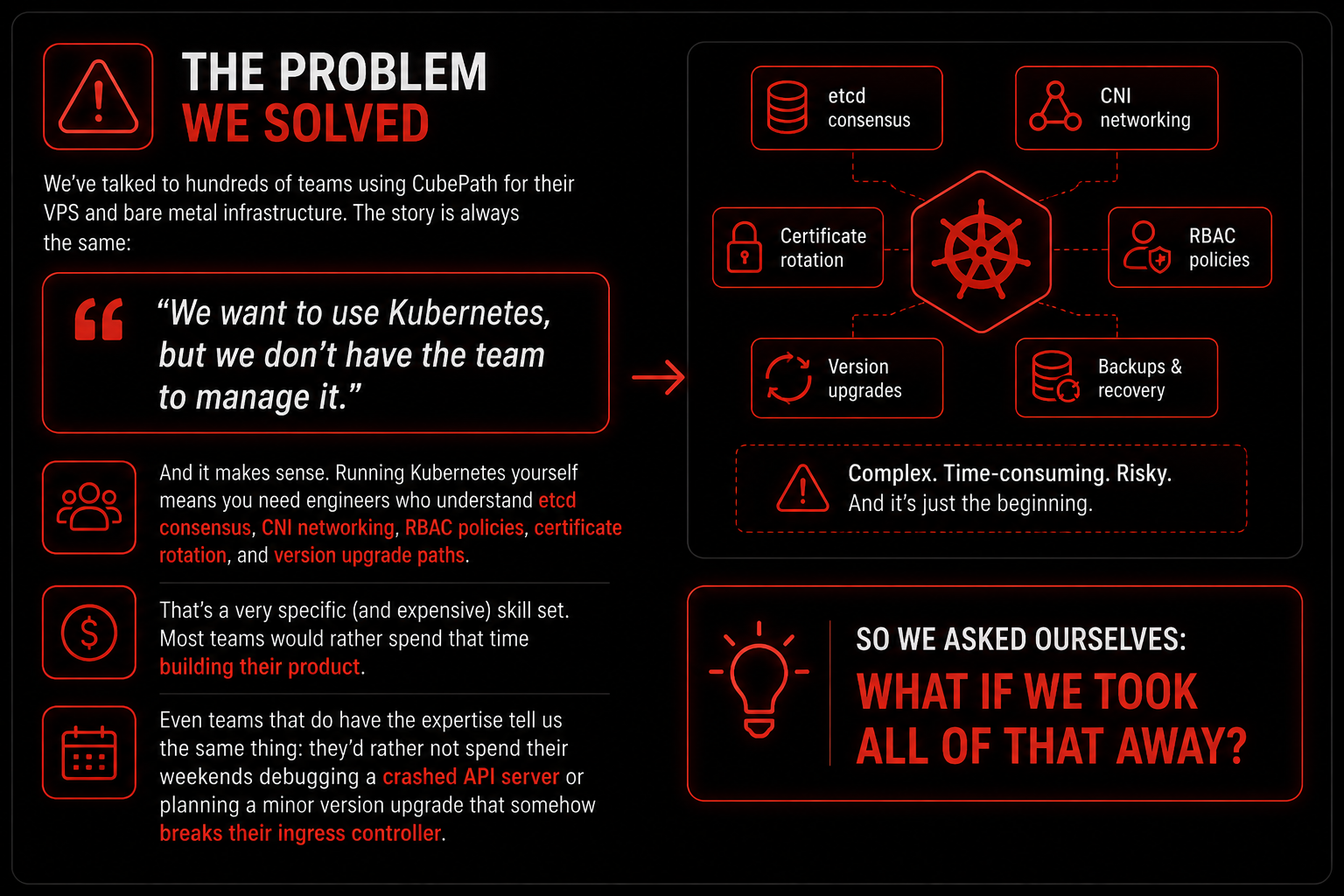
We've talked to hundreds of teams using CubePath for their VPS and bare metal infrastructure. The story is always the same:
"We want to use Kubernetes, but we don't have the team to manage it."
And it makes sense. Running Kubernetes yourself means you need engineers who understand etcd consensus, CNI networking, RBAC policies, certificate rotation, and version upgrade paths. That's a very specific (and expensive) skill set. Most teams would rather spend that time building their product.
Even teams that do have the expertise tell us the same thing: they'd rather not spend their weekends debugging a crashed API server or planning a minor version upgrade that somehow breaks their ingress controller.
So we asked ourselves: what if we took all of that away?
What CubePath Managed Kubernetes Actually Is
When you create a cluster on CubePath, here's what happens behind the scenes:
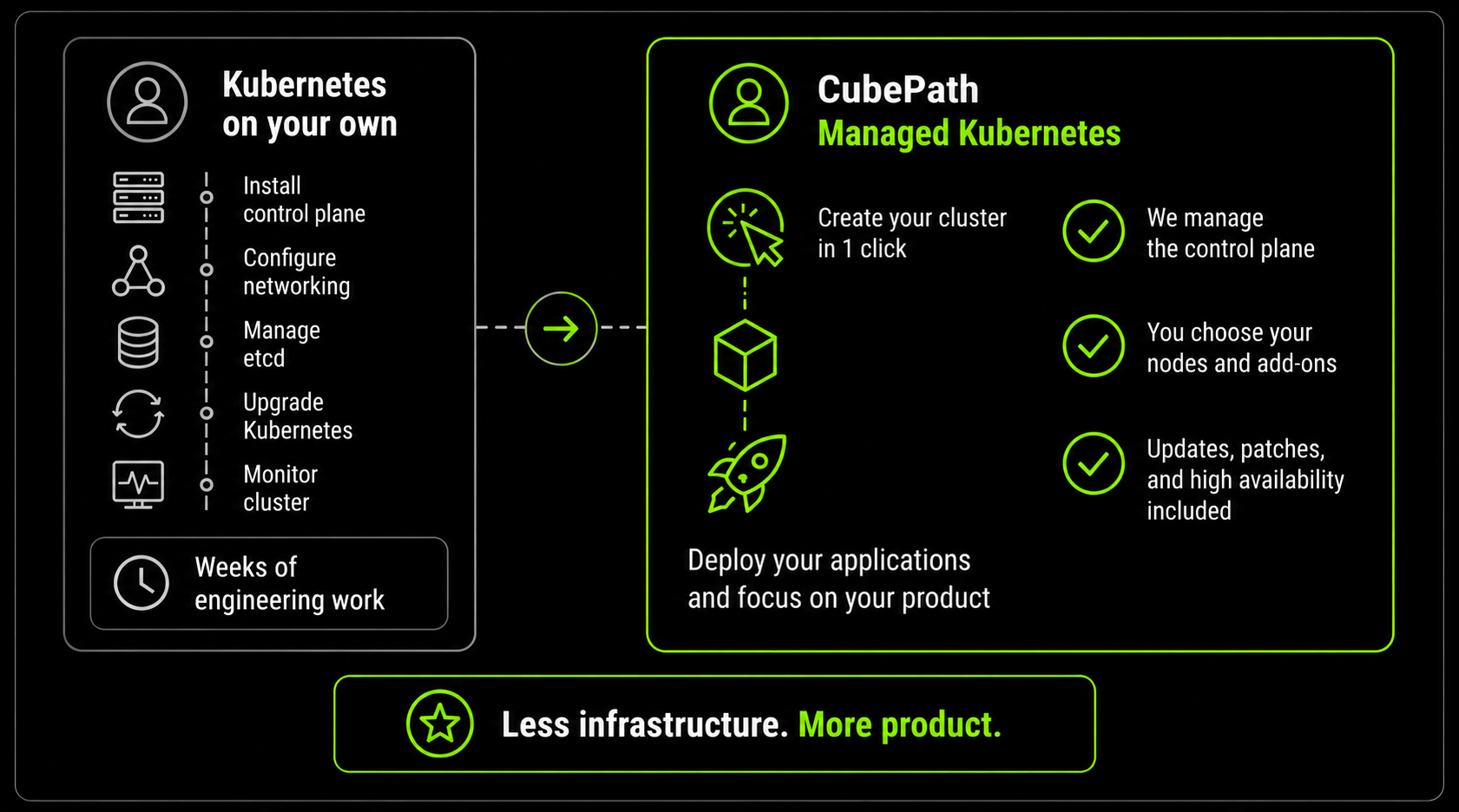
We handle the control plane. The API server, etcd, scheduler, and controller manager are deployed across multiple servers and racks, monitored 24/7, automatically patched, and upgraded without downtime. If something fails, it self-heals. You never touch it, you never worry about it.
You choose your nodes. This is where it gets interesting. Instead of a one-size-fits-all approach, you build your cluster with the exact compute you need:
- Shared CPU: Perfect for dev environments, staging, internal tools, or any workload that doesn't need dedicated resources. Maximum nodes per dollar.
- High Frequency: Latest-gen processors with higher clock speeds. Ideal for latency-sensitive APIs, real-time processing, and anything where single-thread performance matters.
- Dedicated CPU: Guaranteed cores, never shared. For production databases, message brokers, and high-traffic services under SLA.
And here's the key: you can mix all of these in the same cluster. Run your API on High Frequency nodes, your database on Dedicated CPU, and your batch jobs on Shared CPU. Use Kubernetes node selectors to put each workload exactly where it belongs.
The best part? One click. Choose your region, pick your node pools, select your add-ons, and hit deploy. Minutes later, your cluster is running and you have a kubeconfig ready to download.
Add-Ons That Save You Hours
If you've ever set up a Kubernetes cluster, you know the pain doesn't end when the cluster is running. Now you need to install an ingress controller, set up monitoring, configure a GitOps tool, get cert-manager running...
Each of those is a rabbit hole. Which ingress controller do you pick? What Helm values do you need? How do you configure RBAC for ArgoCD? Where do you store the Grafana dashboards?
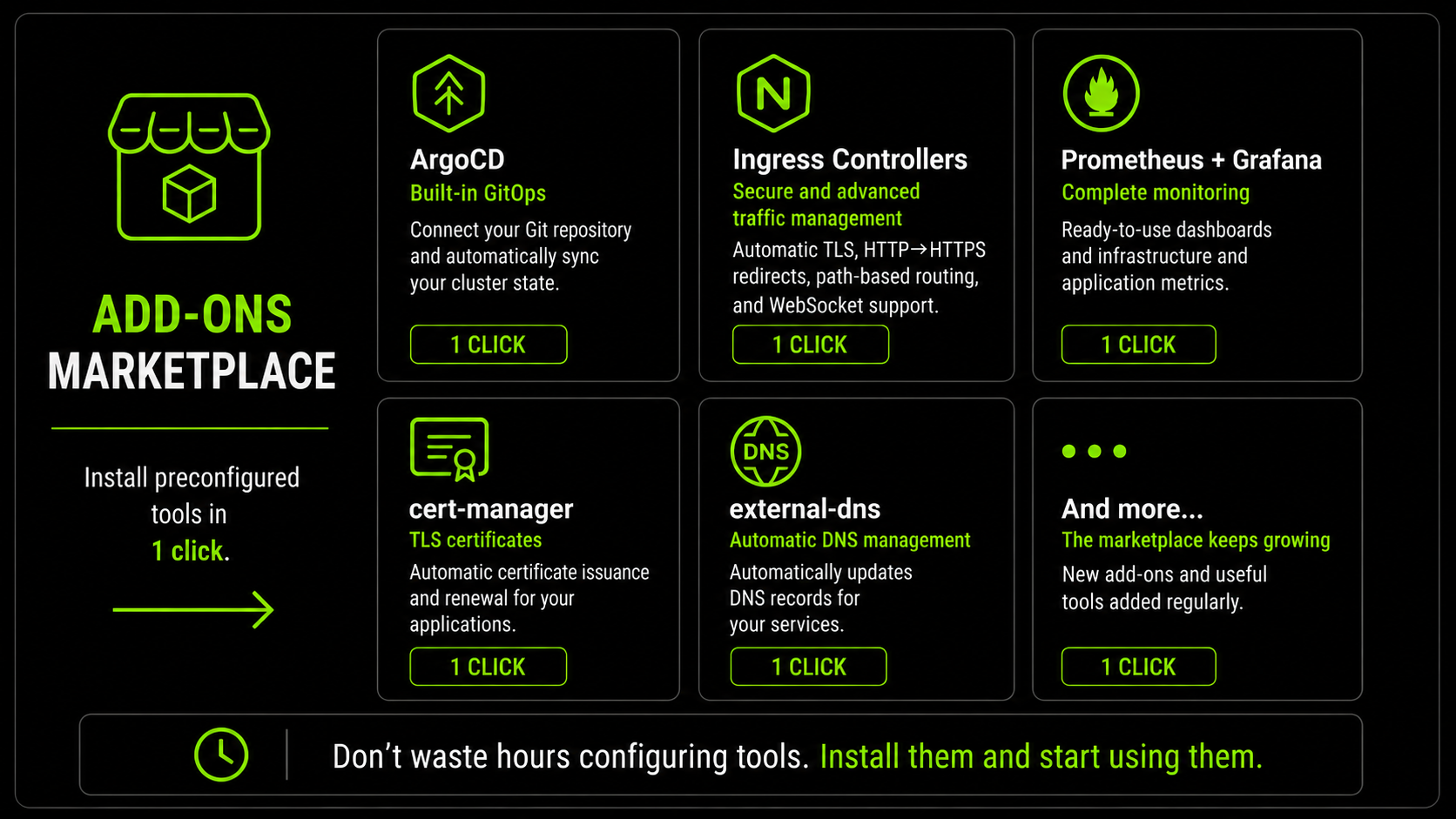
We built the Add-Ons Marketplace to skip all of that. When you create your cluster (or anytime after), you can install pre-configured tools with one click:
ArgoCD. GitOps out of the box. It comes installed, configured, and ready to connect to your Git repo. Push a commit, and your cluster state updates automatically. No more manual kubectl apply in production.
Ingress Controllers. Expose your services with automatic TLS, HTTP-to-HTTPS redirect, path-based routing, and WebSocket support. Already integrated with CubePath Load Balancers so traffic flows from the internet to your pods without any manual plumbing.
Prometheus + Grafana. Monitoring that actually works from minute one. Pre-built dashboards for node health, pod status, API server performance, and resource utilization. You can add custom metrics for your own applications on top.
cert-manager, external-dns, and more. The marketplace keeps growing. Every add-on is a Helm release you can customize, upgrade, or remove from the control panel whenever you want.
The point is simple: you shouldn't need to become a Helm chart expert just to get basic infrastructure tools running on your cluster.
Load Balancers That Just Work
In most Kubernetes setups, getting external traffic into your cluster is surprisingly annoying. You need to set up MetalLB or configure an external load balancer, point DNS at it, deal with health checks...
With CubePath, Load Balancers are a native integration. Create a Kubernetes Service of type LoadBalancer, and we automatically provision one with a public IP. Health checks, TLS termination, HTTP/HTTPS/TCP/UDP, it all works out of the box.
apiVersion: v1
kind: Service
metadata:
  name: my-app
spec:
  type: LoadBalancer
  selector:
    app: my-app
  ports:
  - port: 80
    targetPort: 8080
Apply that, and in seconds your app is reachable from the internet. No manual config, no extra tools.
Built-In Autoscaling That Reacts to Your Workload
One of the most powerful features of CubePath Managed Kubernetes is the built-in cluster autoscaling. You don't need to watch dashboards or manually add nodes when traffic spikes. The cluster does it for you.
Here's how it works: when your pods start requesting more resources than the current nodes can handle, the cluster automatically provisions new nodes from your node pool to absorb the load. When demand drops and nodes are sitting idle, it removes them so you're not paying for compute you don't need.
This works together with Kubernetes Horizontal Pod Autoscaler (HPA), which scales the number of pod replicas based on CPU usage, memory, or custom metrics. So you get two layers of autoscaling working in tandem:
- Pod level: HPA detects your API is getting hammered, spins up more replicas
- Node level: The cluster sees there's not enough room for those new replicas, adds more nodes automatically
- Scale down: Traffic drops, HPA removes extra replicas, the cluster removes the nodes that are no longer needed
You configure the min and max number of nodes per pool, and the cluster handles everything in between. Black Friday traffic spike? Handled. Quiet Sunday morning? You're only paying for what you're actually using.
And here's where it gets really interesting from a cost perspective. At CubePath, instances are billed by the hour. That means autoscaling directly translates to money saved. If your app gets heavy traffic during business hours but barely anything at night, the cluster scales up during the day and scales back down when things go quiet. You only pay for the nodes that are actually running.
Compare that to a traditional setup where you provision servers for peak capacity and pay 24/7 whether you're using them or not. With autoscaling, a cluster that needs 10 nodes during peak hours but only 2 at night costs you exactly that: 10 nodes for a few hours and 2 for the rest. Not 10 nodes around the clock.
For workloads with variable traffic like e-commerce, SaaS platforms, or APIs with usage spikes, this can cut your infrastructure bill significantly without any manual work. The cluster adapts to your traffic, and your bill adapts with it.
No cron jobs, no manual intervention, no over-provisioning "just in case".
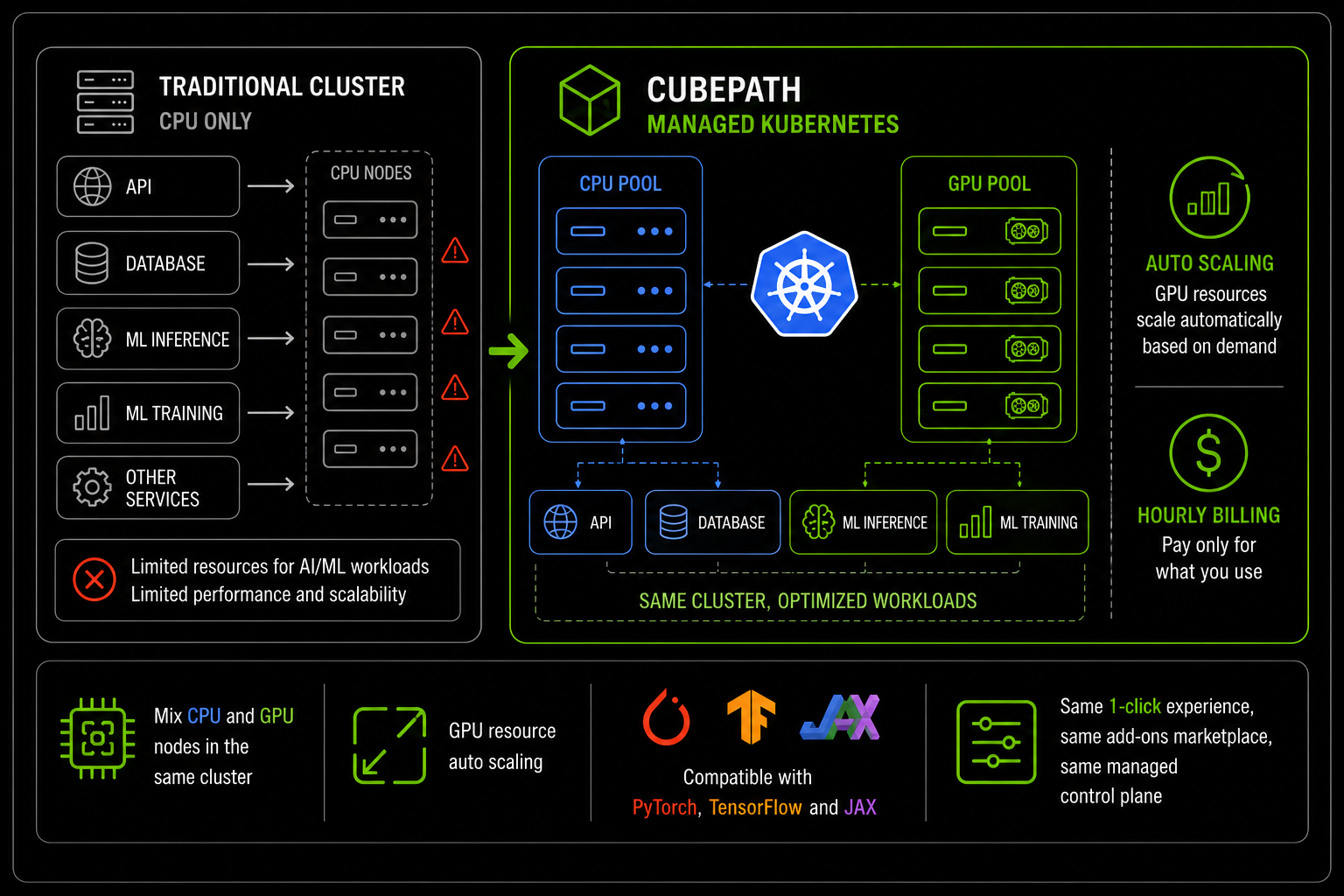
GPU Clusters Are Coming
This one we're really excited about. AI and ML workloads are growing fast, and Kubernetes is how teams are running inference and training at scale. We're bringing GPU node pools to CubePath Managed Kubernetes.
What this means:
- Deploy ML models as Kubernetes services with automatic GPU scheduling
- Distribute training jobs across multiple GPU nodes with PyTorch, TensorFlow, or JAX
- Mix GPU and CPU nodes in the same cluster. Run your API on CPU, inference on GPU
- Autoscale GPU resources based on demand so you only pay for what you use
Same one-click experience, same add-ons marketplace, same managed control plane. Just with GPUs.
Stay tuned, we'll announce availability soon.
Who Is This For?
Startups that can't afford to waste time on infrastructure. You have 5 engineers and none of them should be spending their time managing etcd. Get a cluster running in minutes and focus on shipping your product.
Development teams running microservices. You have 10, 20, 50 services and you need proper orchestration, scaling, and deployment automation. CubePath gives you the platform, ArgoCD gives you GitOps, and your developers never need to SSH into anything.
Agencies juggling multiple client projects. Spin up isolated clusters per client or use namespaces within a shared cluster. Flexible node pools let you right-size each project without maintaining separate Kubernetes installations.
SaaS companies hitting scaling limits. You've outgrown a single server. You need rolling deployments, autoscaling, and zero-downtime updates. This is exactly what Kubernetes was built for, and CubePath removes the operational tax of running it.
AI/ML teams (soon). Once GPU clusters drop, you'll be able to run training and inference on Kubernetes without managing drivers, CUDA, or custom schedulers.
Why Not Just Do It Yourself?
You absolutely can. Kubernetes is open source, and if you have a team of experienced platform engineers, self-managed Kubernetes gives you total control.
But here's the reality for most teams:
Self-managed Kubernetes makes sense at massive scale (20+ clusters) or when you have very specific control plane requirements. For everyone else, the math is clear: the engineering hours you save with a managed service are worth far more than the cluster fee.
Get Started
- Log into the CubePath control panel
- Go to Managed Kubernetes
- Pick your region, node pools, and add-ons
- Click deploy
- Download your kubeconfig and start deploying
That's it. Your cluster is live, your tools are installed, and your team can focus on what they were hired to do: build great software.
CubePath Managed Kubernetes is available now. GPU node pools are coming soon. If you have questions, our team is here to help.